My First On-Device Image!
Overview
After weeks of struggling, I was finally able to capture my first real image using an embedded system. I got stuck at so many places. I knew the hardware itself was fine, because STM posted a sample image project specifically for my X657 Nucleo board, which allowed me to use the B-CAMS-IMX camera module as a USB camera to my laptop, however I faced a ton of issues with using the same camera to store an image on the SD card.
I got the SD card itself working pretty quickly, but the major issue was in allowing the camera to take a frame/image, and store that image in a buffer on memory. I spun on that issue for weeks. No matter what I did, the bytes in the buffer always turned out to be 0.
I eventually found a post on an STM forum, where someone else posted a similar issue with their own N6 board. It turned out to be a few missing lines of code to allow the memory to be written by a non-secure application. I guess because these forum posts are so new, no tutorials/AI models really captured it. I added my own comment to the post to help raise its engagement 🙂
After that, I spent a couple days just cycling through random noisy images. To fix this, I needed to use both pipe0 and pipe1 for the image, adjust the exposure to a middle value and turn on auto-exposure, and change the format from RAW to YUV. And here it is!
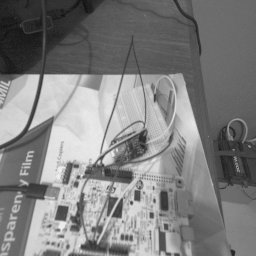
It’s an image of the board setup itself (minus the camera of course), in a 256x256 px greyscale format. It’s not the highest quality, but it can work for a starting point.
Next Steps
Now, I need to take a short break to finish update our temperature prediction paper and hopefully get it approved this time, but once I resume this project, I’m hoping to use the classical CV model next to take a few images of the gauge and try to infer measurements from them.